11.1. 테스트 준비하기
실제 서비스 개발 후 개발자나 QA들은 서비스가 제대로 동작하는지 테스트한다.
NodeBird 서비스에 테스팅을 적용해 보자.
1. jest 패키지 설치
jest는 페이스북에서 만든 오픈 소스 패키지로, 테스팅에 필요한 툴들을 대부분 갖추고 있어 편리하다. 9장의 NodeBird 프로젝트에 jest 패키지를 설치한다. npm i -D jest
2. test 명령어 등록
package.json
{
  "name": "nodebird",
  "version": "0.0.1",
  "description": "익스프레스로 만드는 SNS 서비스",
  "main": "app.js",
  "scripts": {
    "start": "nodemon app",
    "test": "jest"
  },
 ...
 }
3. test 파일 생성
middlewares 폴더 안에 test 파일 index.test.js를 만든다.
테스트용 파일은 파일명과 확장자 사이에 test나 spec을 넣는다.
테스트 코드를 실행하면, 파일명에 test나 spec이 들어간 파일들을 모두 찾아 실행한다.
4. test 코드 작성
middlewares/index.test.js
test('1+1은 2입니다.', () => {
    expect(1+1).toEqual(2);
});- test 함수: 첫 번째 인수에는 테스트에 대한 설명, 두 번째 인수에는 테스트 내용을 넣는다.
- expect 함수: 인수로 실제 코드를 넣는다.
- toEqual 함수: 인수로 예상되는 결과값을 넣는다.
expect 함수의 실제 코드와 값이 일치하면 테스트를 통과한다.
5. npm test 명령으로 테스트
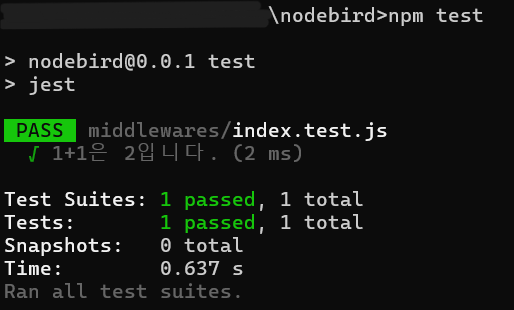
11.2. 유닛 테스트
유닛테스트 (unit test, 단위 테스트)는 작은 단위의 함수나 모듈이 의도된 대로 정확히 작동하는지 테스트하는 것을 말한다.
모킹 (Mocking)
- 테스트 코드의 객체는 실제 익스프레스 객체가 아니어도 된다. 객체와 함수를 모두 구현하는 대신 가짜 객체와 가짜 함수를 만들어 넣는 행위를 모킹이라고 한다.
- 함수를 모킹 할 때는 jest.fn() 메서드를 사용한다.
사용 함수의 반환값을 지정하고 싶다면 jest.fn(() => 반환값)을 사용한다.
1. isLoggedIn과 isNotLoggedIn 함수 테스트
middlewares/index.js
exports.isLoggedIn = (req, res, next) => {
  if (req.isAuthenticated()) {
    next();
  } else {
    res.status(403).send('로그인 필요');
  }
};

exports.isNotLoggedIn = (req, res, next) => {
  if (!req.isAuthenticated()) {
    next();
  } else {
    const message = encodeURIComponent('로그인한 상태입니다.');
    res.redirect(`/?error=${message}`);
  }
};
- describe 함수: 테스트를 그룹화해 주는 역할
첫 번째 인수 - 그룹에 대한 설명, 두 번째 인수인 함수 - 그룹에 대한 내용 - toBeCallerTimes(숫자): 정확하게 몇 번 호출되었는지를 체크하는 메서드
- toBeCalledWith(인수): 특정 인수와 함께 호출되었는지 체크하는 메서드
- 실제로는 req, res 객체에 많은 속성과 메서드가 있지만 테스트에서는 isAuthenticated, status, send만 사용한다.
- res 객체는 여러 테스트에서 사용하는 모양이 같지만,
req 객체는 isAuthenticated 메서드가 다른 모양이므로 각각의 test에 따로 선언한다.
middlewares/index.test.js
const { isLoggedIn, isNotLoggedIn } = require('./');

// isLoggedIn: req, res, next를 모킹
// isAuthenticated: 로그인 여부를 알려주는 함수이므로 테스트 내용에 따라 true나 false를 반환
describe('isLoggedIn', () => {
    const res = {
        status: jest.fn(() => res), // res.status는 메서드 체이닝이 가능해야 하므로 res 반환
        send: jest.fn(),
    };
    const next = jest.fn();

// test 함수 내부에서는 모킹된 객체와 함수를 사용해 isLoggedIn 미들웨어를 호출한 후 expect로 원하는 내용대로 실행되었는지 체크
    test('로그인 되어있으면 isLoggedIn이 next를 호출해야 함', () => {
        const req = {
            isAuthenticated: jest.fn(() => true),
        };
        isLoggedIn(req, res, next);
        expect(next).toBeCalledTimes(1);
    });

    test('로그인 되어있지 않으면 isLoggedIn이 에러를 응답해야 함', () => {
        const req = {
            isAuthenticated: jest.fn(() => false),
        };
        isLoggedIn(req, res, next);
        expect(res.status).toBeCalledWith(403);
        expect(res.send).toBeCalledWith('로그인 필요');
    });
});

describe('isNotLoggedIn', () => {
    const res = {
        redirect: jest.fn(),
    };
    const next = jest.fn();

    test('로그인 되어있으면 isNotLoggedIn이 에러를 응답해야 함', () => {
        const req = {
            isAuthenticated: jest.fn(() => true),
        };
        isNotLoggedIn(req, res, next);
        const message = encodeURIComponent('로그인한 상태입니다.');
        expect(res.redirect).toBeCalledWith(`/?error=${message}`);
    });

    test('로그인 되어있지 않으면 isNotLoggedIn이 next를 호출해야 함', () => {
        const req = {
            isAuthenticated: jest.fn(() => false),
        };
        isNotLoggedIn(req, res, next);
        expect(next).toHaveBeenCalledTimes(1);
    });
});
2. user 컨트롤러 테스트
controllers/user.js
const User = require('../models/user');

exports.follow = async (req, res, next) => {
  try {
    const user = await User.findOne({ where: { id: req.user.id } });
    if (user) { // req.user.id가 followerId, req.params.id가 followingId
      await user.addFollowing(parseInt(req.params.id, 10));
      res.send('success');
    } else {
      res.status(404).send('no user');
    }
  } catch (error) {
    console.error(error);
    next(error);
  }
};
- User 모델은 실제 데이터베이스와 연결되어 있어 테스트 환경에서는 사용할 수 없으므로 모킹해야 한다.
- jest.mock() 메서드에 모킹 할 모듈의 경로를 인수로 넣고 그 모듈을 불러오면
User 모델의 메서드는 전부 가짜 메서드가 된다. - User.findOne 등 가짜 메서드에는 mockReturnValue 등의 메서드가 생성된다.
User.findOne.mockReturnValue 메서드로 User.findOne의 가짜 반환값을 지정할 수 있다.
controllers/user.test.js
jest.mock('../models/user');
const User = require('../models/user');
const { follow } = require('./user');

describe('follow', () => {
  const req = {
    user: { id: 1 },
    params: { id: 2 },
  };
  const res = {
    status: jest.fn(() => res),
    send: jest.fn(),
  };
  const next = jest.fn();

  // 1. DB로부터 사용자를 찾은 후 팔로잉을 추가하는 상황을 테스트
  // mockReturnValue 메서드를 통해 User.findOne이 { addFollowing() } 객체를 반환
  test('사용자를 찾아 팔로잉을 추가하고 success를 응답해야 함', async () => {
    User.findOne.mockReturnValue({
      addFollowing(id) {
        return Promise.resolve(true);
      }
    });
    // follow 함수는 async 함수이므로 await을 붙여야 함수가 전부 실행 완료된 후 expect 함수가 실행된다.
    await follow(req, res, next);
    expect(res.send).toBeCalledWith('success');
  });

  // 2. User.findOne이 null을 반환해 사용자를 찾지 못한 상황을 테스트
  test('사용자를 못 찾으면 res.status(404).send(no user)를 호출함', async () => {
    User.findOne.mockReturnValue(null);
    await follow(req, res, next);
    expect(res.status).toBeCalledWith(404);
    expect(res.send).toBeCalledWith('no user');
  });

  // 3. Promise.reject로 에러가 발생하도록 했다. DB 연결에 에러가 발생한 상황을 모킹한 것이다.
  test('DB에서 에러가 발생하면 next(error) 호출함', async () => {
    const message = 'DB에러';
    User.findOne.mockReturnValue(Promise.reject(message));
    await follow(req, res, next);
    expect(next).toBeCalledWith(message);
  });
});
11.3. 테스트 커버리지
커버리지(coverage) 기능은 전체 코드 중에서 테스트되고 있는 코드의 비율과 테스트되고 있지 않은 코드의 위치를 알려주는 jest의 기능이다.
커버리지 기능 사용하기
- 커버리지 기능을 사용하기 위해 package.json에 jest 설정을 입력한다.
{ "name": "nodebird", "version": "0.0.1", "description": "익스프레스로 만드는 SNS 서비스", "main": "app.js", "scripts": { "start": "nodemon app", "test": "jest", "coverage": "jest --coverage" }, - jest 명령어 뒤에 coverage 옵션을 붙이면 jest가 테스트 커버리지를 분석한다.
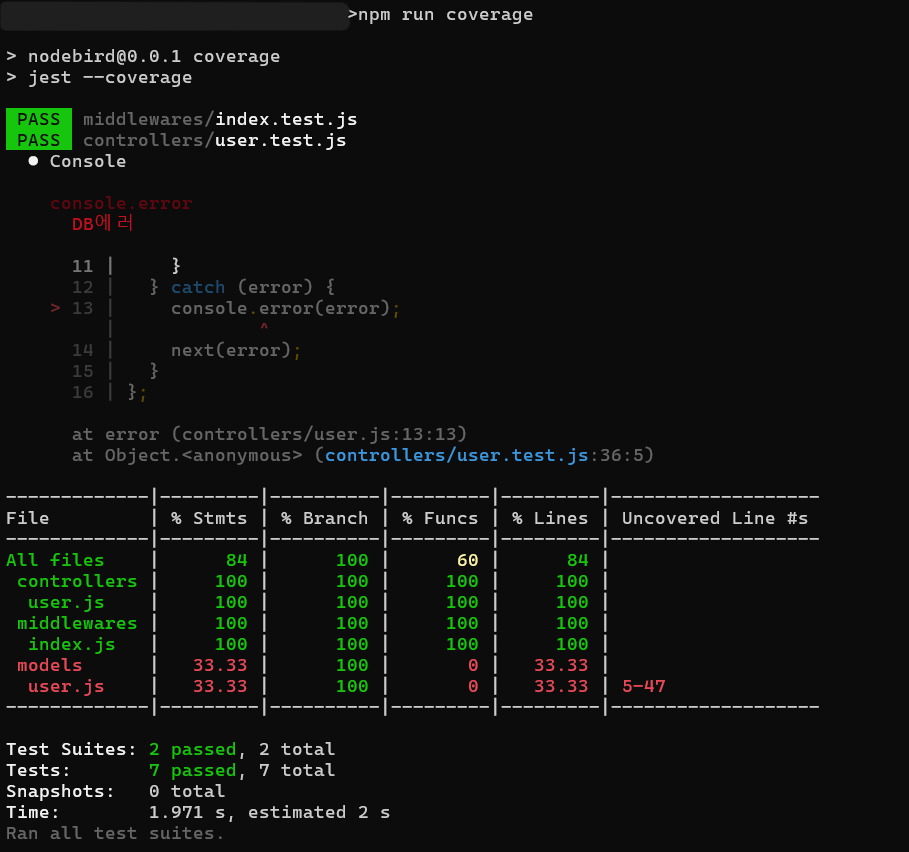
- 테스트 결과와 함께 표가 출력된다. 각 열의 의미는 아래와 같다.
File 파일과 폴더 이름 % Stmts 구문 비율 % Branch if문 등의 분기점 비율 % Funcs 함수 비율 % Lines 코드 줄 수 비율 Uncovered Line #s 커버되지 않은 줄 위치 - 전체 파일 중에서는 84%의 구문과 100%의 분기점, 60%의 함수, 84%의 코드 줄 수가 커버되었음을 알 수 있다.
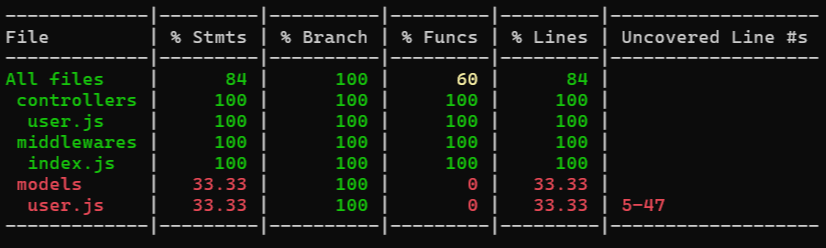
명시적으로 테스트하고 requires 한 코드만 커버리지 분석이 되기 때문에
테스트 커버리지가 100%라 하더라도 실제로 모든 코드를 테스트한 것은 아닐 수 있다. - models/user.js에서는 33.33%의 구문과 100%의 분기점, 0%의 함수, 33.33%의 코드 줄이 커버되었다.
또한, 다섯 번째 줄부터 47번째 줄까지는 테스트되지 않았다는 것을 보여준다.
이 부분에 테스트를 하나도 작성하지 않았으므로 % Funcs가 0%로 나오는 것이다.
models/user.js
const Sequelize = require('sequelize'); class User extends Sequelize.Model { static initiate(sequelize) { User.init({ email: { type: Sequelize.STRING(40), allowNull: true, unique: true, }, nick: { type: Sequelize.STRING(15), allowNull: false, }, password: { type: Sequelize.STRING(100), allowNull: true, }, provider: { type: Sequelize.ENUM('local', 'kakao'), allowNull: false, defaultValue: 'local', }, snsId: { type: Sequelize.STRING(30), allowNull: true, }, }, { sequelize, timestamps: true, underscored: false, modelName: 'User', tableName: 'users', paranoid: true, charset: 'utf8', collate: 'utf8_general_ci', }); } static associate(db) { db.User.hasMany(db.Post); db.User.belongsToMany(db.User, { foreignKey: 'followingId', as: 'Followers', through: 'Follow', }); db.User.belongsToMany(db.User, { foreignKey: 'followerId', as: 'Followings', through: 'Follow', }); } }; module.exports = User; - 테스트 커버리지를 올리기 위해 테스트를 작성한다.
initiate와 associate 메서드가 제대로 호출되는지 테스트하는 코드이다.
models/user.test.js
const Sequelize = require('sequelize'); const User = require('./user'); const config = require('../config/config')['test']; const sequelize = new Sequelize( config.database, config.username, config.password, config, ); describe('User 모델', () => { test('static init 메서드 호출', () => { expect(User.initiate(sequelize)).toBe(undefined); }); test('static associate 메서드 호출', () => { const db = { User: { hasMany: jest.fn(), belongsToMany: jest.fn(), }, Post: {}, }; User.associate(db); expect(db.User.hasMany).toHaveBeenCalledWith(db.Post); expect(db.User.belongsToMany).toHaveBeenCalledTimes(2); }); }); - models 폴더에 모델이 아닌 테스트 파일을 생성했으므로 models/index.js를 수정해야 한다.
models/index.js
const Sequelize = require('sequelize'); const fs = require('fs'); const path = require('path'); const env = process.env.NODE_ENV || 'development'; const config = require('../config/config')[env]; const db = {}; const sequelize = new Sequelize( config.database, config.username, config.password, config, ); db.sequelize = sequelize; const basename = path.basename(__filename); fs .readdirSync(__dirname) // 현재 폴더의 모든 파일을 조회 .filter(file => { // 숨김 파일, index.js, js 확장자가 아닌 파일 필터링 return (file.indexOf('.') !== 0) && (file !== basename) && (file.slice(-3) === '.js'); }) .forEach(file => { // 해당 파일의 모델 불러와서 init const model = require(path.join(__dirname, file)); console.log(file, model.name); db[model.name] = model; model.initiate(sequelize); }); Object.keys(db).forEach(modelName => { // associate 호출 if (db[modelName].associate) { db[modelName].associate(db); } }); module.exports = db; - 다시 수행하면, 테스트 커버리지가 상승한 것을 볼 수 있다.

11.4. 통합 테스트
통합 테스트(integration test)는 하나의 라우터에 붙어 있는 여러 개의 미들웨어와 다양한 라이브러리가 모두 유기적으로 잘 작동하는지 테스트하는 것이다.
1. supertest 패키지 설치
auth.js의 라우터들을 테스트하기 위해 supertest 패키지를 설치한다. npm i -D supertest
2. app 객체 분리
supertest를 사용하기 위해서는 app 객체를 모듈로 만들어 분리해야 한다.
app.js 파일에서 app 객체를 모듈로 만들고, server.js에서 불러와 listen 한다.
app.js에는 순수한 서버 코드만 남게 되고, server.js는 app의 포트 리스닝만 담당한다.
app.js
...
app.use((err, req, res, next) => {
  console.error(err);
  res.locals.message = err.message;
  res.locals.error = process.env.NODE_ENV !== 'production' ? err : {};
  res.status(err.status || 500);
  res.render('error');
});

module.exports = app;
server.js
const app = require('./app');

app.listen(app.get('port'), () => {
    console.log(app.get('port'), '번 포트에서 대기중');
});
3. npm start 명령어 변경
npm start 명령어도 바뀐 파일에 맞게 변경한다.
package.json
{
  "name": "nodebird",
  "version": "0.0.1",
  "description": "익스프레스로 만드는 SNS 서비스",
  "main": "app.js",
  "scripts": {
    "start": "nodemon server",
    "test": "jest",
    "coverage": "jest --coverage"
  },
4. 테스트용 데이터베이스 설정
통합 테스트에서는 데이터베이스 코드를 모킹 하지 않으므로 데이터베이스에 실제로 테스트용 데이터가 저장된다. 실제 서비스 중인 데이터베이스에 테스트용 데이터가 들어가면 안 되므로 테스트용 데이터베이스를 따로 만드는 것이 좋다.
config/config.json에 test 속성을 수정한다. 테스트 환경에서는 test 속성의 정보를 사용해 데이터베이스에 연결하게 된다.
{
  "development": {
    "username": "root",
    "password": "nodejsbook",
    "database": "nodebird",
    "host": "127.0.0.1",
    "dialect": "mysql"
  },
  "test": {
    "username": "root",
    "password": "nodejsbook",
    "database": "nodebird_test",
    "host": "127.0.0.1",
    "dialect": "mysql"
  },
 ...
}
콘솔에 nodebird_test 데이터베이스를 생성하는 명령어를 입력한다. npx sequelize db:create --env test
5. 테스트 코드 작성
routes/auth.test.js
const request = require('supertest');
const { sequelize } = require('../models');
const app = require('../app');

beforeAll(async () => {			// beforeAll : 모든 테스트를 실행하기 전에 수행해야 할 코드
  await sequelize.sync(); 		// sequelize.sync() : 데이터베이스에 테이블 생성
});

// 회원 가입 테스트
describe('POST /join', () => {
  test('로그인 안 했으면 가입', (done) => {
    request(app)			// request 함수를 불러와서 app 객체를 인수로 넣는다.
      .post('/auth/join')		// 요청
      .send({				// 데이터
        email: 'zerohch0@gmail.com',
        nick: 'zerocho',
        password: 'nodejsbook',
      })
      .expect('Location', '/')		// Location 헤더가 /인지 테스트
      .expect(302, done);		// 응답 상태 코드가 302인지 테스트
      					// 콜백 함수의 매개변수 done을 통해 테스트가 마무리되었음을 알린다.
  });
});

// 로그인한 상태에서 회원 가입 시도하는 경우를 테스트
describe('POST /join', () => {
  const agent = request.agent(app);
  beforeEach((done) => {		// 테스트 실행에 앞서 먼저 실행되는 부분 - agent 객체로 로그인
    agent
      .post('/auth/login')
      .send({
        email: 'zerohch0@gmail.com',
        password: 'nodejsbook',
      })
      .end(done);			// beforeEach 함수가 마무리되었음을 알린다.
  });

// 로그인된 agent로 회원 가입 테스트
  test('이미 로그인했으면 redirect /', (done) => {
    const message = encodeURIComponent('로그인한 상태입니다.');
    agent
      .post('/auth/join')
      .send({
        email: 'zerohch0@gmail.com',
        nick: 'zerocho',
        password: 'nodejsbook',
      })
      .expect('Location', `/?error=${message}`)
      .expect(302, done);
  });
});

// 로그인과 로그아웃 테스트
describe('POST /login', () => {
  test('가입되지 않은 회원', (done) => {
    const message = encodeURIComponent('가입되지 않은 회원입니다.');
    request(app)
      .post('/auth/login')
      .send({
        email: 'zerohch1@gmail.com',
        password: 'nodejsbook',
      })
      .expect('Location', `/?error=${message}`)
      .expect(302, done);
  });

  test('로그인 수행', (done) => {
    request(app)
      .post('/auth/login')
      .send({
        email: 'zerohch0@gmail.com',
        password: 'nodejsbook',
      })
      .expect('Location', '/')
      .expect(302, done);
  });

  test('비밀번호 틀림', (done) => {
    const message = encodeURIComponent('비밀번호가 일치하지 않습니다.');
    request(app)
      .post('/auth/login')
      .send({
        email: 'zerohch0@gmail.com',
        password: 'wrong',
      })
      .expect('Location', `/?error=${message}`)
      .expect(302, done);
  });
});

describe('GET /logout', () => {
  test('로그인 되어있지 않으면 403', (done) => {
    request(app)
      .get('/auth/logout')
      .expect(403, done);
  });

  const agent = request.agent(app);
  beforeEach((done) => {
    agent
      .post('/auth/login')
      .send({
        email: 'zerohch0@gmail.com',
        password: 'nodejsbook',
      })
      .end(done);
  });

  test('로그아웃 수행', (done) => {
    agent
      .get('/auth/logout')
      .expect('Location', `/`)
      .expect(302, done);
  });
});

// 테스트 종료 시 데이터를 정리하는 코드
afterAll(async () => {			// afterAll : 모든 테스트가 끝난 후에 수행해야 할 코드
  await sequelize.sync({ force: true });
});
11.5. 부하 테스트
부하 테스트(load test)는 서버가 얼마만큼의 요청을 견딜 수 있는지 테스트하는 방법이다.
코드에 문법적, 논리적 문제가 없더라도 서버의 하드웨어 제약 때문에 서비스가 중단될 수 있다.
ex) OOM (Out Of Memory)
부하테스트를 통해 이를 어느 정도 미리 예측할 수 있다.
- artillery를 설치하고 npm start 명령어로 서버를 실행한다. npm i -D artillery
- npx artillery quick --count 100 -n 50 http://localhost:8001 명령으로 부하 테스트한다.
--count 옵션: 가상의 사용자 수, -n 옵션: 요청 횟수
100명의 가상 사용자가 50번씩 요청을 보내므로 총 5000번의 요청이 서버로 전달된다.
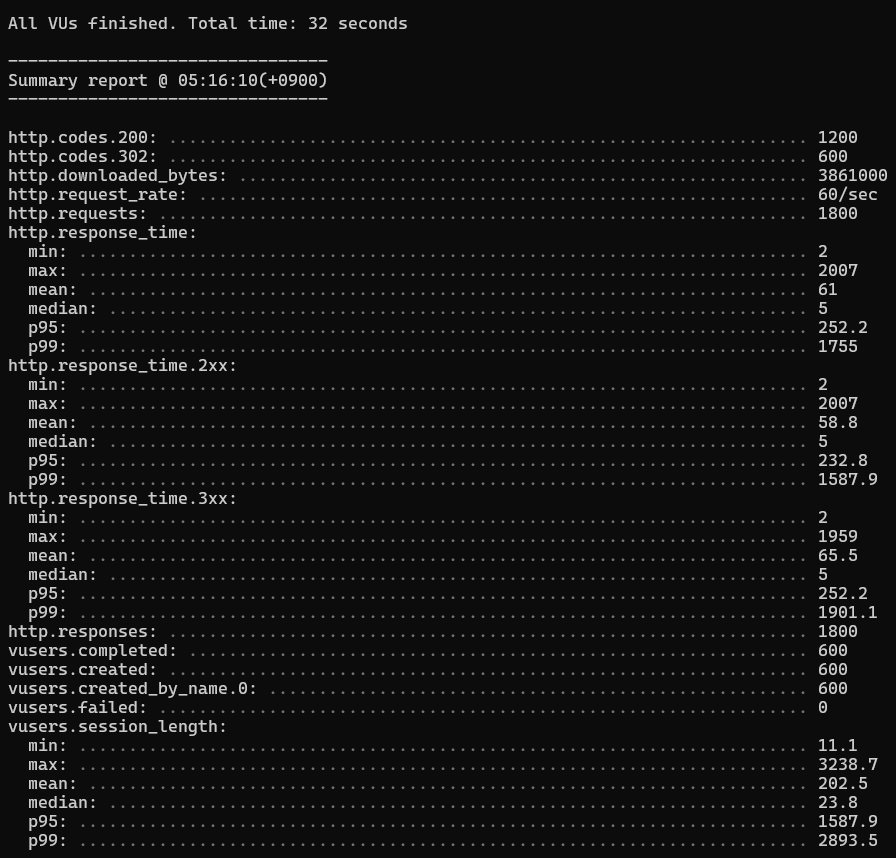
Total time 테스트하는데 총 15초 소요됨 vusers.created 가상의 사용자 100명 생성됨 vusers.completed 그들의 테스트가 전부 완료됨 http.requests, http.responses 모든 요청과 응답이 각각 5000번 수행되었음 http.request_rate 처리 속도, 초당 140번 요청 처리 http.codes.200 HTTP 상태 코드 http.response_time 응답 지연 속도 - 최소(min), 최대(max), mean(평균), median(중간값), p95(하위 95%), p99(하위 99%) - 실제 사용자의 행동을 모방해 시나리오 작성하여 부하 테스트를 할 수도 있다.
JSON 형식의 설정 파일을 작성하고 npx artillery run loadtest.json 명령을 실행한다.
loadtest.json
{
    "config": {
      "target": "http://localhost:8001",
      "http": {
        "timeout": 30
      },
      "phases": [
        {
          "duration": 30,
          "arrivalRate": 20
        }
      ]
    },
    "scenarios": [
      {
        "flow": [
          {
            "get": {
              "url": "/"
            }
          },
          {
            "post": {
              "url": "/auth/login",
              "json": {
                "email": "zerohch0@gmail.com",
                "password": "Wpfhsms0!!"
              },
              "followRedirect": false
            }
          },
          {
            "get": {
              "url": "/hashtag?hashtag=nodebird"
            }
          }
        ]
      }
    ]
  }
Quiz
- (jest)는 페이스북에서 만든 오픈 소스 패키지로, 테스팅에 필요한 툴들을 대부분 갖추고 있어 편리하다.
- 테스트용 파일은 파일명과 확장자 사이에 (test)나 (spec)을 넣는다.
- 작은 단위의 함수나 모듈이 의도된 대로 정확히 작동하는지 테스트하는 것을 (유닛 테스트)라고 한다.
- 객체와 함수를 모두 구현하는 대신가짜 객체와 가짜 함수를 만들어 넣는 행위를 (모킹)이라고 한다.
- 전체 코드 중에서 테스트되고 있는 코드의 비율과 테스트되고 있지 않은 코드의 위치를 알려주는 jest의 기능은 (커버리지) 기능이다.
- 하나의 라우터에 붙어 있는 여러 개의 미들웨어와 다양한 라이브러리가 모두 유기적으로 잘 작동하는지 테스트하는 것은 (통합 테스트)이다.
- (부하 테스트)는 서버가 얼마만큼의 요청을 수용할 수 있는지 테스트하는 방법이다.
Programming Quiz
1. isLoggedIn 함수를 테스트하는 코드이다. 빈칸에 들어갈 코드를 채우시오.
middlewares/index.test.js
const { isLoggedIn, isNotLoggedIn } = require('./');

// isLoggedIn: req, res, next를 모킹

describe('isLoggedIn', () => {
    const res = {
    // (1) res.status는 메서드 체이닝이 가능해야 하므로 res 반환
        status: ___________________,
        send: jest.fn(),
    };
    const next = jest.fn();

    test('로그인 되어있으면 isLoggedIn이 next를 호출해야 함', () => {
        const req = {
    // (2) isAuthenticated: 로그인 여부를 알려주는 함수이므로 테스트 내용에 따라 true나 false를 반환
            isAuthenticated: ______________________),
        };
    // (3) 모킹된 객체와 함수를 사용해 isLoggedIn 미들웨어를 호출한 후 expect로 원하는 내용대로 실행되었는지 체크
        ______________________;
        ______________________;
    });

    test('로그인 되어있지 않으면 isLoggedIn이 에러를 응답해야 함', () => {
        const req = {
            isAuthenticated: jest.fn(() => false),
        };
        isLoggedIn(req, res, next);
        expect(res.status).toBeCalledWith(403);
        expect(res.send).toBeCalledWith('로그인 필요');
    });
});
2. auth.js 라우터를 통합 테스트하는 코드의 일부분이다. 빈칸에 들어갈 코드를 채우시오.
routes/auth.test.js
const request = require('supertest');
const { sequelize } = require('../models');
const app = require('../app');

// (1) 모든 테스트를 실행하기 전에 수행해야 할 코드
__________(async () => {
  await sequelize.sync();
});

// 회원 가입 테스트
describe('POST /join', () => {
  test('로그인 안 했으면 가입', (done) => {
    request(app)
      .post('/auth/join')
      .send({
        email: 'zerohch0@gmail.com',
        nick: 'zerocho',
        password: 'nodejsbook',
      })
// (2) Location 헤더가 /인지 테스트한다.
      ___________________
// (3) 응답 상태 코드가 302인지 테스트한다.
      ___________________
  });
});

...

// (4) 모든 테스트가 끝난 후에 수행해야 할 코드
__________(async () => {
  await sequelize.sync({ force: true });
});
Answer
1.
const { isLoggedIn, isNotLoggedIn } = require('./');

// isLoggedIn: req, res, next를 모킹

describe('isLoggedIn', () => {
    const res = {
    // (1) res.status는 메서드 체이닝이 가능해야 하므로 res 반환
        status: jest.fn(() => res),
        send: jest.fn(),
    };
    const next = jest.fn();

    test('로그인 되어있으면 isLoggedIn이 next를 호출해야 함', () => {
        const req = {
    // (2) isAuthenticated: 로그인 여부를 알려주는 함수이므로 테스트 내용에 따라 true나 false를 반환
            isAuthenticated: jest.fn(() => true),
        };
    // (3) 모킹된 객체와 함수를 사용해 isLoggedIn 미들웨어를 호출한 후 expect로 원하는 내용대로 실행되었는지 체크
        isLoggedIn(req, res, next);
        expect(next).toBeCalledTimes(1);
    });

    test('로그인 되어있지 않으면 isLoggedIn이 에러를 응답해야 함', () => {
        const req = {
            isAuthenticated: jest.fn(() => false),
        };
        isLoggedIn(req, res, next);
        expect(res.status).toBeCalledWith(403);
        expect(res.send).toBeCalledWith('로그인 필요');
    });
});
2.
const request = require('supertest');
const { sequelize } = require('../models');
const app = require('../app');

// (1) 모든 테스트를 실행하기 전에 수행해야 할 코드
beforeAll(async () => {
  await sequelize.sync();
});

// 회원 가입 테스트
describe('POST /join', () => {
  test('로그인 안 했으면 가입', (done) => {
    request(app)
      .post('/auth/join')
      .send({
        email: 'zerohch0@gmail.com',
        nick: 'zerocho',
        password: 'nodejsbook',
      })
// (2) Location 헤더가 /인지 테스트한다.
      .expect('Location', '/')
// (3) 응답 상태 코드가 302인지 테스트한다.
      .expect(302, done);
  });
});

...

// (4) 모든 테스트가 끝난 후에 수행해야 할 코드
afterAll(async () => {
  await sequelize.sync({ force: true });
});
출처 : 조현영, 『 Node.js 교과서 개정 3판』, 길벗(2022)
'Programming > Node.js' 카테고리의 다른 글
| [Node.js] 10. 웹 API 서버 만들기 (0) | 2025.01.01 |
|---|---|
| [Node.js] 9. 익스프레스로 SNS 서비스 만들기 (0) | 2024.12.26 |
| [Node.js] 6. 익스프레스 웹 서버 만들기 (0) | 2024.11.19 |
| [Node.js] 3. 노드 기능 알아보기 (1) (1) | 2024.10.09 |
| [Node.js] 2. JavaScript 정리 (0) | 2024.10.09 |